Principal Component Analysis (PCA)
Principal component analysis (PCA) is a method for reduction of dimensionality
of a feature space, i.e. we want to choose only few features (or measurements)
from a large pool of measurements available. The problem is also called feature
extraction. In today's labs, the PCA will be used to extract measurements from
the 'space' of facial images.
Let us have a set of facial images, with resolution of 300x250 pixels. Let's
reorganise image pixels to a vector of length n
= 75000 (= 300 * 250). This vector represents the image as a point in n
dimensional space. I.e. we have n measurements on each image, each
corresponding to a single pixel. Using PCA, we will find a representation of the
images in a lower-dimensional space. The dimensionality of the new
representation will be m, m << n. Facial images will then be
classified in the m-dimensional space by nearest neighbour search.
Theory
Let us have k samples Xi
∈ Rn (e.g. the vectorised images
of faces). PCA searches for m < n vectors Yj
∈ Rm , such that vectors Xi
are approximated by linear combinations of Yj
with the lowest least squares residuum. I.e. each vector Xi
is approximated by a linear combination of Yjs.
Let us denote the approximation by Zi.
Zi = ∑j
wij Yj,
i = 1, ... , k; j = 1, ... , m
the residuum
g(
Yj,
wij) = ∑
i ||
Xi
-
Zi ||
2
is minimised. Each input vector
Xi
is represented by only by
m coefficents
wij,
j = 1, ... ,
m
of the linear combination, i.e. by an
m-dimensional vector.
The vectors
Yj
are found as eigenvectors
of matrix
S =
XXT. First
m eigenvectors, corresponding to
m
highest eigenvalues are used. The matrix
X is of dimension
n×
k
and stores the input measurements: i-th column of X contains
Xi.
The coefficients
wij
of the linear combination are then found as dot products
wij =
XiT
Yj
In the case of representation of images of faces, the eigenvectors Yj
are dubbed eigenfaces.
A useful trick
As is often the case when working with images, the matrix S soon becomes too large to
be represent in a computer's memory. In our case, S would need about 45 GB.
Therefore, we emplooy the following trick [1, 3].
In the original task formulation, eigenvectors of S = XXT
(n×n)
are computed (n = 75000).
Su = λu
Instead of S, let us construct a smaller matrix
T
=
XTX
(
k×
k).
The relation between eigenvectors of
S and
T is
Tv = (
XTX)
v = λ
v
X(
XTX)
v = Xλ
v = λ(X
v)
S(
Xv) = λ(
Xv)
Therefore, if we look for first
m
≤
k eigenvectors of
S
only, it is sufficient to compute eigenvectors of much smaller matrix
T.
Multiplying them by matrix
X we obtain the desired eigenvectors of
S.
Summary
Here we list the operations which you will need to implement. We will denote the
original n-dimensional input space as image-space, and the reduced m-dimensional
space as the face-space.
Transformation from image-space to face-space - Dot-product of an
input image Xi
with each of the eigenvectors Yj,
j = 1, ... ,m
Transformation from face-space to the image-space - the linear
combination: weigted sum of eigenvectors, the weights were given by the previous
operation.
Partial image reconstruction - the transformation from face-space to
image-space, but using only several first eigenvectors.
Learning of a face - transformation of input image to face-space and
storing the m-dimensional vector of weights.
Recognition of a face - transformation of input image to face-space,
and finding the nearest neighbour of the m-dimensional representaiton. If the
closest face representation is closer than a threshold, return the found
identity, otherwise return 'unknown' face.
How is an image face-like? - Transform the image to face-space and
back. Compute the mean squared error between the input and the reconstructed
images. If the error is large, the image does not resemble a face.
The task
- Download images of faces (data_33rpz_cv12.mat).
The file contains training (structure trn_data)
and test (structure tst_data)
data. The structures contain fields images
(with images) and names
(with names of persons on the images, i.e. identifiers for the recognition problem).
- Implements PCA using the above described trick.. Use images from trn_data
as input, to find the eigenvectors.
Tip 1:
Eigenvectors and eigenvalues are in Matlab computed by function eig.
Tip 2:
Normalise the computed eigenvectors to unit length.
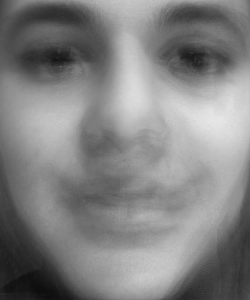
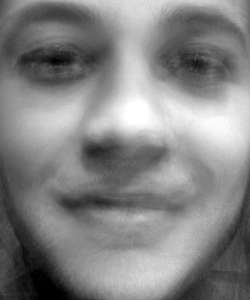
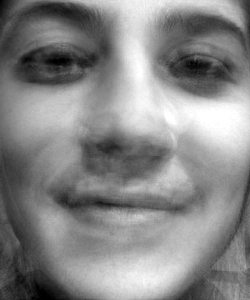
- Display the eigenvectors (eigenfaces) as images. I.e. reorganise vectors Y
to matrices of the same size as the input images.
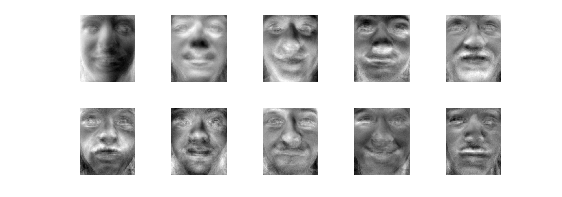
...
- What does the first eigenvector correspond to?
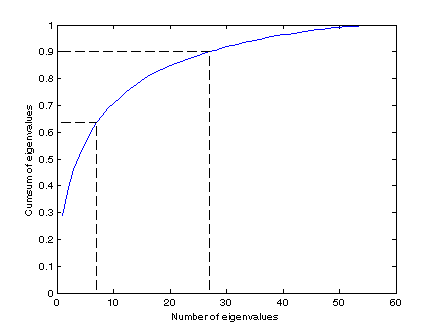
- Plot the cumulative sum of normalised (i.e. that they sum to one)
eigenvalues (skip the first one).
Depending on the task, the number of eigenvectors used to approximate the
data is chosen so that the cumulative sum of their respective eigenvalues is
about 65%-90% of the sum of all eigenvalues.
- Draw partial reconstructions of a selected face, while increasing the
number of used eigenvectors
- Using the nearest neighbour classification in the face-space, classify the
images from tst_data.
Experiment with the number of eigenvectors (the dimensionality m of
the face-space) Print the classification error.
Bonus task
What to do next? With the knowledge gained in this term, you can
- ... experiment with another (better ?) classifier in the face-space,
- ... try to align the faces first, i.e. before computing the PCA. (Use
another data file, where the faces are not so tightly
clipped, so you have some space to crop the images. For inspiration, see [2]),
- ... experiment with PCA on letters, which were used on previous labs (e.g.
with data for Adaboost labs),
- ... compare PCA with Independent Component Analysis (ICA),
- ... implement a simple (although slow) face detector (see end of Summary
Section),
- ...
Any of the given topics is considered a bonus task. The formulations are vague
intentionally, the precise task formulation, and specification of inputs, is
part of the task.
References
[1] Eigenfaces
for recognition talk
[2]
Face
alignment for increased PCA
precision
[3] Turk, M. and Pentland, A. (1991). Eigenfaces for recognition. The
Journal of Cognitive Neuroscience, 3(1): 71-86.
Created by Jan
Šochman. Last updated 18.7.2011